
ASUS ExpertBook
Ultra B9406CAA
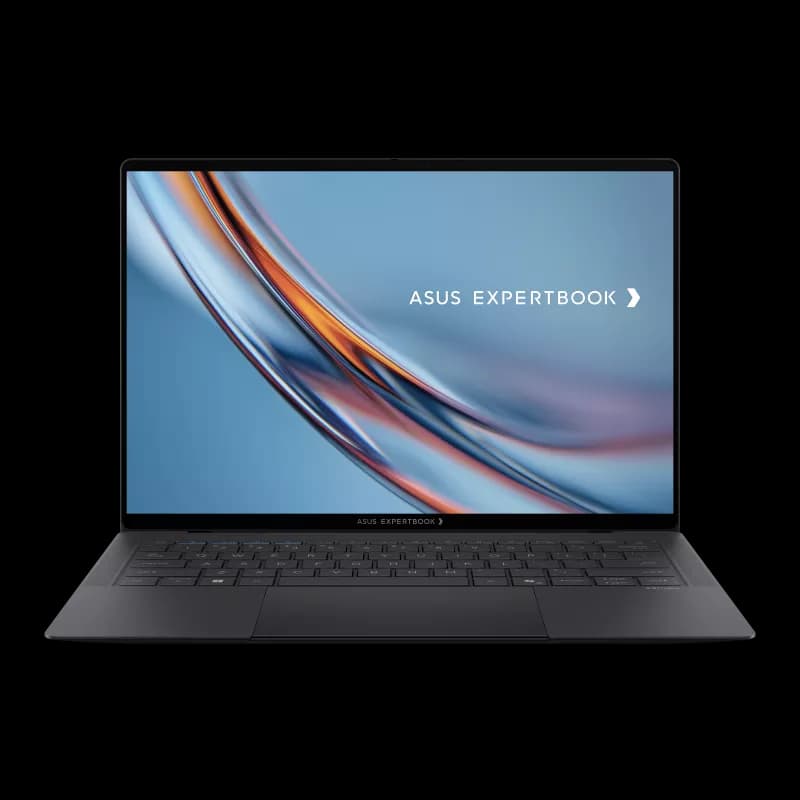
Powered by Intel Core Ultra X7 358H with Arc B390 graphics, the 2026 ASUS ExpertBook Ultra B9406CAA is a premium business ultrabook built around Panther Lake, a 3K Tandem OLED touch display, Wi-Fi 7, and a 70Wh battery. This TechPP benchmark profile keeps the focus on clean, buyer-friendly scores, realistic competitors, and configuration notes that matter before purchase.
Headline Numbers
Cinebench R23 Multi
19,841
Primary Score
2,079
R23 Single-Core
PCMark 10
9,892
ASUS ExpertBook Ultra Performance Benchmarks
Geekbench, Cinebench, PCMark, GPU, storage, gaming, and battery numbers for the Core Ultra X7 358H model.
| Benchmark | Score | Test Profile | How to Use It |
|---|---|---|---|
| Geekbench 6 CPU | 2,003 / 11,026 to 2,836 / 16,674 | Single / multi-core | Use the upper result for peak AC performance and the lower result as a conservative baseline. |
| Geekbench GPU | 56,031 | GPU compute | Useful for comparing integrated GPU compute, not gaming FPS. |
| Geekbench AI | OpenVINO CPU result available | AI inference | Confirms the Core Ultra X7 358H platform and Windows 11 Pro test environment. |
| PCMark 10 | 7,567 to 9,892 | Whole-system productivity | Large range because PCMark changes with power mode and test profile. |
| Cinebench R23 | 2,056-2,079 single / 14,212-19,841 multi | CPU rendering | Single-core is consistent; multi-core depends heavily on sustained power and fan mode. |
| 3DMark Time Spy | 5,485 to 7,270 | DirectX 12 graphics | Best quick indicator of Arc B390 gaming and GPU headroom. |
| 3DMark Fire Strike | 11,821 to 14,258 | DirectX 11 graphics | Useful for older games and lighter 3D workloads. |
| CrystalDiskMark | 14,001.92 MB/s read / 7,753.20 MB/s write | SSD throughput | Very fast storage result for large file transfers and app loading. |
| Gaming | 79 fps Tomb Raider / 46 fps Cyberpunk 2077 | 1080p gaming | Shows that Arc B390 can handle modern games, but this is still not a gaming laptop. |
| Battery | 15h+ video rundown / 16h 05m WLAN | Real-world endurance | Excellent result for a high-end Windows ultraportable. |
RAM & Storage Benchmarks
Storage is one of the ExpertBook Ultra's biggest strengths. The tested SSD is fast enough for large file transfers, heavy spreadsheet work, local media libraries, and quick application launches.
| Test | Result | Profile | What It Means |
|---|---|---|---|
| Memory | 32GB LPDDR5X-8533 | System RAM | Very fast soldered memory; choose the right capacity at purchase. |
| Maximum Memory | Up to 64GB LPDDR5X | Configuration option | Good ceiling for a sub-1.2kg business laptop, but not user-upgradeable. |
| SSD Read | 14,001.92 MB/s | CrystalDiskMark sequential read | Excellent for large files, app loading, and project transfers. |
| SSD Write | 7,753.20 MB/s | CrystalDiskMark sequential write | Strong write speed for exports, archives, and large local sync jobs. |
| Tested Storage | 2TB PCIe 4.0 NVMe | Tested configuration | ASUS also lists PCIe 5.0 storage options by configuration. |
App Opening & Responsiveness Benchmarks
Exact app-by-app launch times were not available for every test app, so this section uses measured system responsiveness proxies: PCMark, SSD throughput, and memory configuration.
| Task | Result | Confidence |
|---|---|---|
| Productivity | PCMark 10: 9,892 | Measured benchmark |
| SSD Read | 14,001.92 MB/s | Measured SSD result |
| SSD Write | 7,753.20 MB/s | Measured SSD result |
| RAM Speed | LPDDR5X-8533 | Configuration spec |
Chart values mix scores, MB/s, and MT/s, so use it as a responsiveness profile. The table gives the exact test meaning.
Geekbench 6 CPU Ranking
Geekbench is good for quick CPU comparison, but it is sensitive to cooling, firmware, and power profile. ASUS can score differently depending on thermal mode and power state, so the main result and conservative baseline are both included.
| Laptop | Single-Core | Multi-Core | Processor |
|---|---|---|---|
| MacBook Pro 14 M5 | 4,288 | 17,926 | Apple M5 |
| Dell XPS 14 2026 | 2,867 | 16,927 | Core Ultra X7 358H |
| ASUS ExpertBook Ultra | 2,836 | 16,674 | Core Ultra X7 358H |
| ASUS ExpertBook Ultra (baseline) | 2,202 | 14,644 | Core Ultra X7 358H |
| HP EliteBook X G1i | 2,844 | 11,181 | Core Ultra 7 268V |
| ThinkPad X9 14 | 2,639 | 10,607 | Core Ultra 7 258V |
CPU Performance Context
Cinebench Scores vs. Reference Laptops
Higher is better. This chart includes direct rivals and higher-power reference machines, so use it for performance scale rather than a pure same-class buying list.
All Cinebench Versions: ExpertBook Ultra
| Benchmark | Multi-Core | Single-Core |
|---|---|---|
| Cinebench R15 | 3,039 | 309 |
| Cinebench R20 | 7,736 | 788 |
| Cinebench R23 | 19,841 | 2,079 |
| Cinebench R24 | 1,125 | 124 |
R24 scores use a different scale than R23, so they are not directly comparable across versions.
GPU & 3DMark Performance
Intel Arc B390 is the standout part of this laptop. The verified score range puts it well ahead of older Intel integrated graphics and close to the 2026 XPS 14's integrated-GPU class.
3DMark Scores
Higher is better. Different tests target different APIs.
Gaming Performance (1080p)
Average FPS, higher is better. Tested at low/medium settings.
Cyberpunk 2077 was measured at 1080p Ultra without XeSS/FSR, so there is room to improve FPS with upscaling.
Time Spy
5,485-7,270
TR to NBC range
Fire Strike
11,821
Baseline overall
Wild Life
32,544
GPU overall
3DMark 11
18,628
Performance
Battery & Thermal Performance
Battery Life Comparison
WiFi browsing endurance in hours (higher is better). ExpertBook tested at 16h 05min.
Thermal Envelope
Power draw and CPU temperature across load levels (lower temp = cooler).
The ExpertBook Ultra can boost hard for short workloads, then settles into a lower sustained envelope. Full performance requires AC power.
WiFi Browsing
16h 05m
Continuous use
Full Load
1.8h
Stress test
Battery Capacity
70Wh
Built-in
Charge Speed
65W
USB-C PD
| Battery Test | Result | Meaning |
|---|---|---|
| Wi-Fi browsing | 16h 05m | Best practical all-day endurance number. |
| Video rundown | 15h+ class | Strong travel result for offline playback and flights. |
| Battery capacity | 70Wh | Large pack for a machine starting around 0.99kg. |
| USB-C charger | 65W | Portable charger, but not a high-wattage fast-charge brick. |
| Full-load runtime | About 1.8h | Heavy CPU/GPU loads drain the battery quickly, as expected for this class. |
| Efficiency | About 13.8 min/Wh WLAN | 16.08 hours from a 70Wh battery indicates excellent light-work efficiency. |
ASUS ExpertBook Ultra vs Other Benchmarks
A simple rank table showing where the ExpertBook Ultra stands in the tests that matter most.
| Benchmark | ASUS Score | Best Comparable Result | ASUS Rank | Takeaway |
|---|---|---|---|---|
| Geekbench 6 Multi | 16,674 | MacBook Pro 14 M5: 17,926 | #3 of 6 | Very close to Dell XPS 14 and below MacBook Pro 14 M5. |
| Geekbench 6 Single | 2,836 | MacBook Pro 14 M5: 4,288 | #3 of 6 | Strong Windows result; Apple still leads single-core. |
| Cinebench R23 Multi | 19,841 | HP ZBook Ultra G1a: 30,706 | #3 of 7 | Excellent for an ultralight; heavier workstations still win. |
| 3DMark Time Spy | 5,485-7,270 | ASUS peak: 7,270 | #1 in integrated-GPU class | Arc B390 is the main performance story. |
| SSD Read | 14,001.92 MB/s | ASUS ExpertBook Ultra | #1 in this table | Outstanding sequential read speed. |
| Battery Life | 16h 05m WLAN | MacBook Pro / XPS LED configs can last longer | Top tier | Among the strongest Windows ultraportable results. |
| Weight | 0.99kg starting / 1.11kg tested | ASUS ExpertBook Ultra | #1 | Lighter than XPS 14, XPS 16, and MacBook Pro 14. |
Direct Competitor Spec Snapshot
A cleaner same-class comparison against the premium 14-inch laptops buyers are most likely to consider. Exact availability and options vary by region and configuration.
| Feature | ASUS ExpertBook Ultra | Dell XPS 14 | Dell XPS 16 | MacBook Pro 14 | ThinkPad X9 14 | HP EliteBook X | Zenbook 14 |
|---|---|---|---|---|---|---|---|
| Processor | |||||||
| CPU Model | Intel Core Ultra X7 358H | Up to Intel Core Ultra X7 358H | Up to Intel Core Ultra X7 358H | Apple M5 / M5 Pro / M5 Max | Intel Core Ultra 7 258V/268V class | Intel Core Ultra 7 268V class | Core Ultra / Ryzen AI options |
| Architecture | Panther Lake-H | Panther Lake-H | Panther Lake-H | Apple silicon | Lunar Lake | Lunar Lake | Varies by Zenbook model |
| Best fit | Executive business laptop with unusually strong iGPU | Closest premium Windows alternative | Bigger-screen X7 alternative | Best sustained performance and macOS workflow | Premium ThinkPad alternative | Enterprise HP alternative | Lower-cost ASUS consumer alternative |
| Power / performance note | 63W PL2 / 41W PL1 measured | Similar chipset, heavier chassis | Same platform class with more screen area | Higher sustained CPU/GPU ceiling | Efficiency-first 14-inch design | Efficiency-first enterprise design | Consumer tuning, usually less enterprise-focused |
| Graphics | |||||||
| GPU Model | Intel Arc B390, 12 Xe3 cores | Intel Arc B390 | Intel Arc B390 | Apple integrated GPU | Intel Arc 140V class | Intel Arc 140V class | Intel Arc / Radeon / Snapdragon iGPU by model |
| Graphics position | Very strong for integrated graphics | Very similar iGPU class | Similar iGPU in larger laptop | Strongest for pro creative apps | Good efficiency-class iGPU | Good efficiency-class iGPU | Good, but model-dependent |
| Gaming note | 46 fps Cyberpunk 2077 Ultra and 79 fps Tomb Raider | Good integrated-gaming option | Good integrated-gaming option | Game library depends on macOS support | Light gaming only | Light gaming only | Light gaming only |
| Memory & Storage | |||||||
| RAM | 32GB LPDDR5X-8533 tested; up to 64GB listed | Up to 64GB LPDDR5X | Up to 64GB LPDDR5X | Up to 128GB unified memory on high-end configs | Up to 32GB class | 32GB class common | Up to 32GB class on many models |
| Storage | 2TB PCIe 4.0 tested; PCIe 5.0 options listed | Up to 4TB class | Up to 4TB class | Up to 8TB | Up to 2TB class | Up to 2TB class | Up to 1TB/2TB class by model |
| Upgrade reality | RAM soldered; SSD config-dependent | RAM soldered; SSD config-dependent | RAM soldered; SSD config-dependent | Not user-upgradeable | RAM soldered; SSD config-dependent | RAM soldered; SSD config-dependent | RAM usually soldered |
| Display | |||||||
| Panel Type | 14" 3K Tandem OLED touch | 14" 2K LCD or 2.8K OLED touch | 16" 2K LCD or 3.2K OLED touch | 14.2" Liquid Retina XDR | 14" OLED options | 14" IPS/OLED options | 14" OLED options |
| Refresh Rate | 30-120Hz VRR | 1-120Hz LCD or 20-120Hz OLED | 1-120Hz LCD or 20-120Hz OLED | 120Hz ProMotion | Up to 120Hz class | Config dependent | Up to 120Hz class |
| Brightness | 600 nits SDR; 1,403 nits HDR measured | 500 nits LCD / OLED listed lower typical | 500 nits class panel options | Very strong sustained HDR | OLED config-dependent | Config-dependent business panels | OLED config-dependent |
| Build & Battery | |||||||
| Weight | 0.99kg starting; 1.11kg tested | 3 lb / 1.36kg class | Larger 16-inch chassis | About 1.55kg | About 1.21kg class | Starting at 1.18kg | Around 1.2kg class on Zenbook 14/S 14 |
| Battery Capacity | 70Wh | Dell lists long-runtime configs; review units vary | 70Wh class | 72.4Wh class on 14-inch M5 Pro/Max specs | 55Wh class | 60Wh class | Typically 72Wh class on Zenbook S 14 / varies |
| Measured Battery Life | 16h 05m WLAN / just over 15h video rundown | 12h 23m OLED / 20h 41m LED | Configuration-dependent | About 18h class in comparable testing | Configuration-dependent | Very strong in tested EliteBook X configs | Often strong, model-dependent |
| Connectivity | |||||||
| Wi-Fi | Wi-Fi 7 (802.11be) | Wi-Fi 7 / Bluetooth 6 | Wi-Fi 7 / Bluetooth 6 | Wi-Fi 6E / 7 by chip generation | Wi-Fi 7 | Wi-Fi 7 | Wi-Fi 6E / 7 by model |
| Ports | 2x Thunderbolt 4, 2x USB-A, HDMI, audio | 3x Thunderbolt 4, audio | 3x Thunderbolt 4, audio | Thunderbolt, HDMI, SDXC, MagSafe | USB-C heavy, HDMI on some configs | Business port mix by config | Consumer ultrabook port mix |
| Business angle | MIL-STD-810H, enterprise security focus | Premium prosumer | Premium larger prosumer | macOS ecosystem | ThinkPad service/support | HP enterprise security/support | Consumer value and design |
The TechPP Verdict
The Good (8)
- Starts at 0.99kg, with tested configurations around 1.11kg depending on options
- 16h 05m WLAN-class battery life and 15h+ video-rundown-class endurance
- Cinebench R23 Multi scales up to 19,841 in peak verified performance mode
- 3K Tandem OLED touch display reaches around 600 nits SDR and roughly 1,400 nits HDR
- Intel Arc B390 delivers unusually strong integrated graphics performance
- 79 fps in Shadow of the Tomb Raider and 46 fps in Cyberpunk 2077 at 1080p
- MIL-STD-810H durability rating for business use
- Wi-Fi 7, Bluetooth 6.0, two Thunderbolt 4 ports, HDMI, and two USB-A ports
The Bad (4)
- Maximum performance is AC-power dependent; battery mode lowers the power ceiling
- High CPU temperatures are possible in Performance mode
- Premium positioning means pricing can overlap Dell XPS 14, MacBook Pro 14, ThinkPad X9, and EliteBook X territory
- Soldered RAM, no upgrade path beyond the configured option
Bottom Line
The ASUS ExpertBook Ultra B9406CAA is not just a light business laptop with a nice screen. The benchmark profile shows a real leap in integrated graphics performance, strong everyday system scores, and unusually good battery life for a 14-inch Windows machine. The main caveat is consistency: full performance depends on AC power and the selected fan mode. For mobile professionals who value portability, ports, OLED quality, and occasional GPU-heavy work, it is one of the strongest 2026 business ultrabooks to shortlist.