
SD card types and symbols explained
An SD card has a dozen tiny marks printed on it, and each one tells you something about its size or speed. I have drawn every card type and every mark below, so you can match them to the card in your hand.
SD, miniSD and microSD, to scale
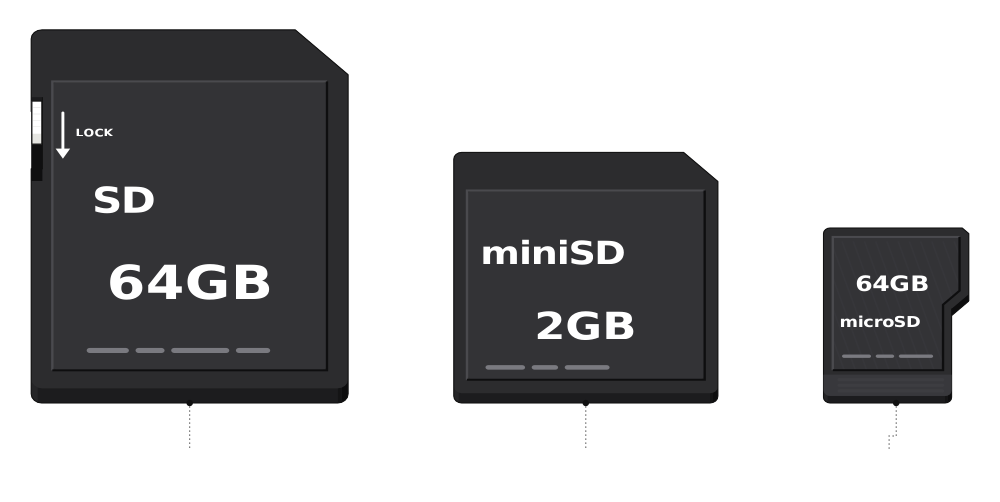 SD: 32 x 24 x 2.1 mmminiSD: 21.5 x 20 x 1.4 mmmicroSD: 15 x 11 x 1 mm
Parts of an SD card
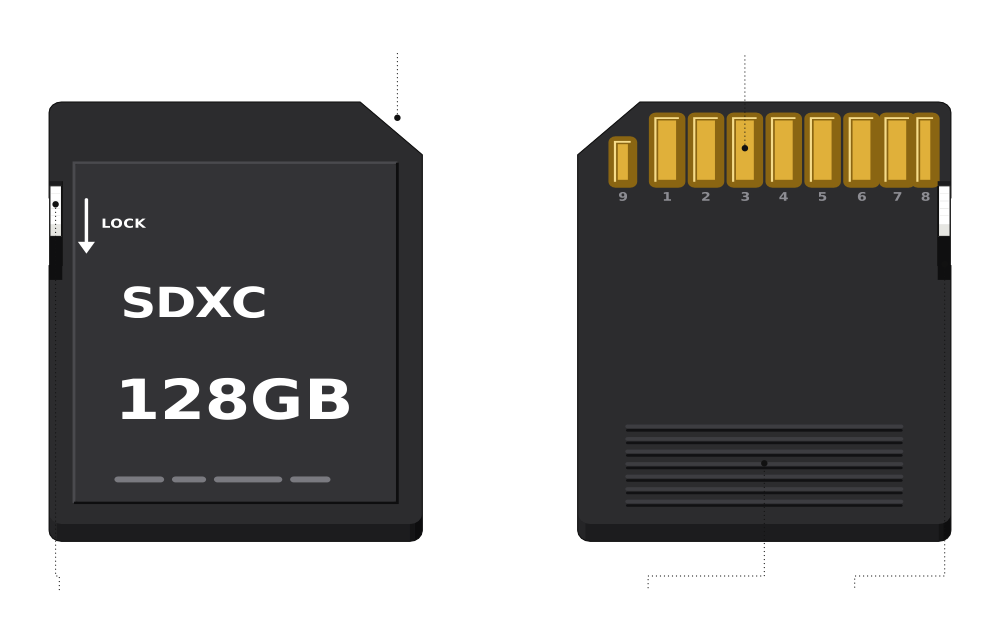 Cut corner shows which way inLock switch9 gold contacts on the backSlide down to make it read-onlyGrip ridges
The lock switch only asks your device to treat the card as read-only, so some readers ignore it.
microSD and the SD adapter
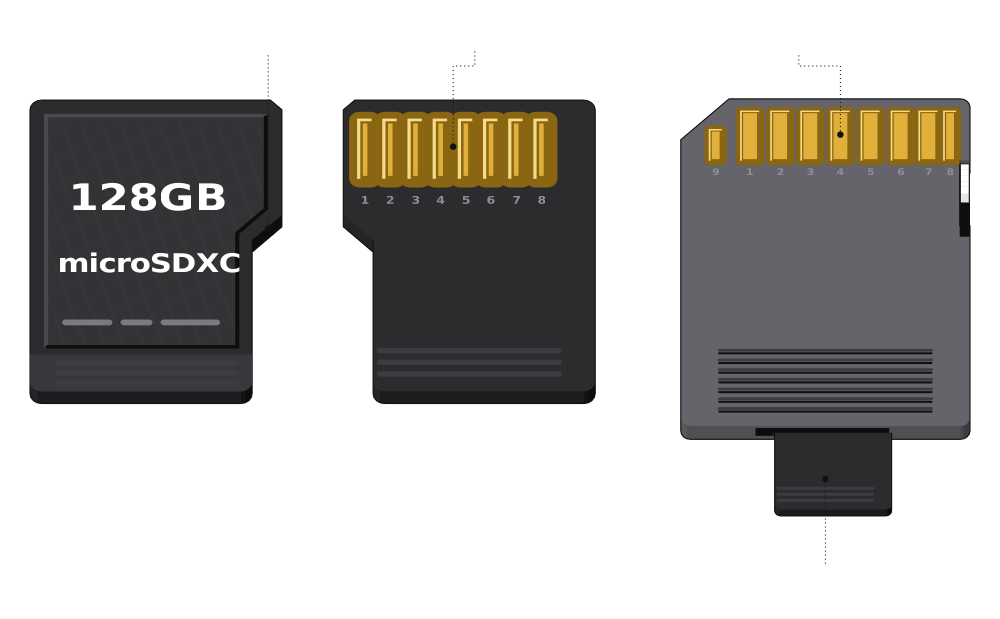 A step on one side: fits one way8 contactsSlides into an SD adapterThe adapter's own 9 contacts fit any SD slot
SD vs SDHC vs SDXC vs SDUC
| Logo | Capacity | File system |
|---|---|---|
 | Up to 2 GB | FAT12, FAT16 |
 | 2 GB to 32 GB | FAT32 |
 | 32 GB to 2 TB | exFAT |
 | 2 TB to 128 TB | exFAT |
A device that reads SDXC also reads SDHC and SD, but an older SDHC-only camera cannot read an SDXC card.
What the symbols on an SD card mean
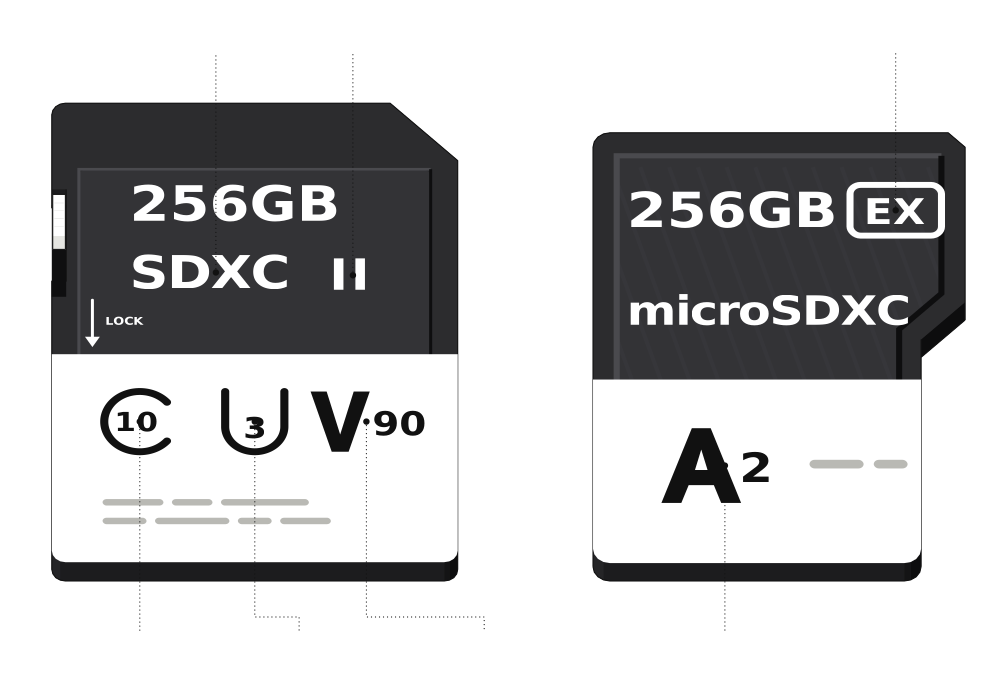 Capacity typeBus: UHS-IISpeed Class 10UHS Speed Class 3Video Speed Class 90SD ExpressApp Performance A2
The speed marks are the slowest a card is allowed to write, so the real speed is usually higher.
Speed Class
| Mark | Minimum write |
|---|---|
 | 2 MB/s |
 | 4 MB/s |
 | 6 MB/s |
 | 10 MB/s |
Video Speed Class
| Mark | Minimum write |
|---|---|
 | 6 MB/s |
 | 10 MB/s |
 | 30 MB/s |
 | 60 MB/s |
 | 90 MB/s |
UHS Speed Class
| Mark | Minimum write |
|---|---|
 | 10 MB/s |
 | 30 MB/s |
App Performance Class
| Mark | Random IOPS | Minimum write |
|---|---|---|
 | 1,500 read, 500 write | 10 MB/s |
 | 4,000 read, 2,000 write | 10 MB/s |
Bus interface
| Mark | Bus | Top bus speed |
|---|---|---|
 | UHS-I | 104 MB/s |
 | UHS-II | 312 MB/s |
 | UHS-III | 624 MB/s |
 | SD Express | 985 to 3,940 MB/s |
UHS-I vs UHS-II
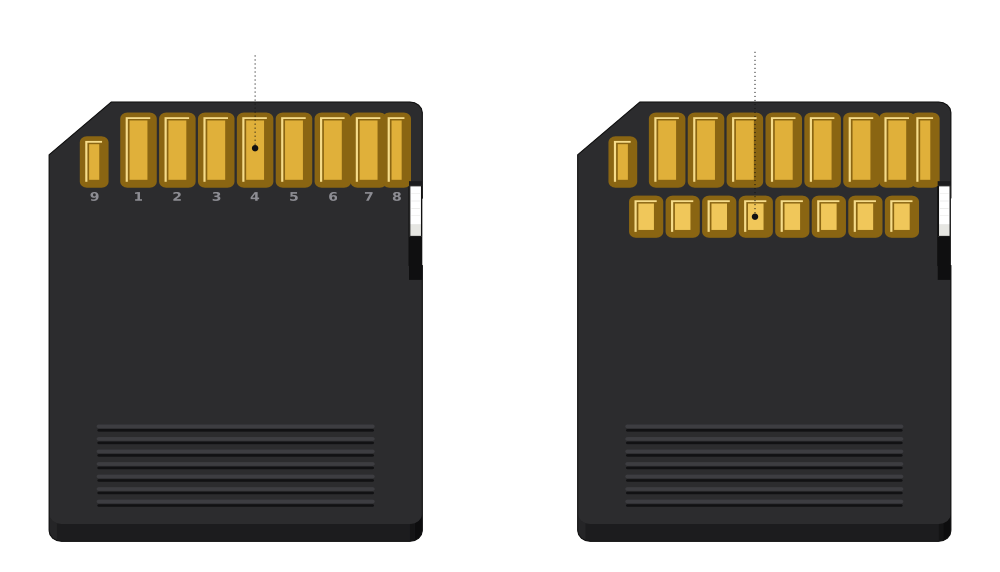 UHS-I: one row, 9 contactsUHS-II: a second row, 17 in all
The second row only helps in a UHS-II slot; anywhere else, a UHS-II card runs at UHS-I speed.
Which SD card should you buy?
| Look for | For | Why |
|---|---|---|
| Phone or tablet | microSDXC with A2 runs apps from the card faster |
| 4K video | V30 (or U3) keeps up with most 4K cameras |
| 8K or high-bitrate 4K | V60 or V90, in a UHS-II camera |
| Nintendo Switch 2 | Only microSD Express cards can save games |
| Nintendo Switch | A UHS-I microSDXC card |
SD card sizes compared
| Format | Size | Where you see it |
|---|---|---|
| SD | 32 x 24 x 2.1 mm | Cameras, laptops, card readers |
| miniSD | 21.5 x 20 x 1.4 mm | Old phones; replaced by microSD |
| microSD | 15 x 11 x 1 mm | Phones, drones, action cams, Switch |
Comments
0Share your thoughts, questions, or feedback about this guide.